
draw anti-aliased circular arcs in a shader with glslify
Possibly useful for:
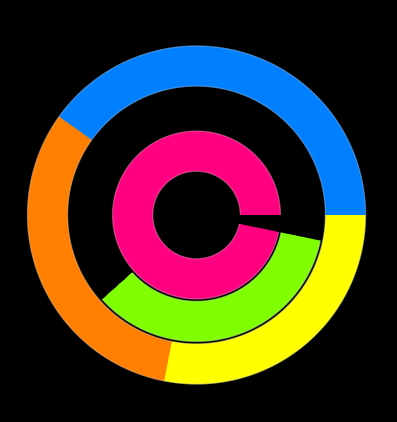
var glsl = require('glslify')
var regl = require('regl')()
var mesh = require('glsl-circular-arc')()

var menu = regl({
  frag: glsl`
    precision highp float;
    #pragma glslify: mask = require('glsl-circular-arc/mask')
    varying vec2 vpos;
    uniform vec2 size, radius;
    uniform vec3 color;
    void main () {
      float m = mask(size, vpos, radius);
      if (m < 0.01) discard;
      gl_FragColor = vec4(color,m);
    }
  `,
  vert: glsl`
    precision highp float;
    #pragma glslify: plot = require('glsl-circular-arc/plot')
    attribute vec2 position;
    uniform vec2 size, theta;
    varying vec2 vpos;
    void main () {
      vpos = plot(position, theta);
      vec2 aspect = vec2(1,size.x/size.y);
      gl_Position = vec4(vpos*aspect*0.5,0,1);
    }
  `,
  blend: {
    enable: true,
    func: { src: 'src alpha', dst: 'one minus src alpha' }
  },
  uniforms: {
    size: function (context) {
      return [context.viewportWidth,context.viewportHeight]
    },
    theta: regl.prop('theta'),
    radius: regl.prop('radius'),
    color: regl.prop('color')
  },
  attributes: {
    position: mesh.positions
  },
  elements: mesh.cells
})

regl.frame(function frame (context) {
  regl.clear({ color: [0,0,0,1], depth: true })
  var t = context.time
  var st = Math.sin(t)*0.5+0.5
  menu([
    {
      theta: [0,st*2*Math.PI],
      radius: [0.25,0.5],
      color: [1,0,0.5]
    },
    {
      theta: [1*st*4,st*2*Math.PI],
      radius: [0.5,0.75],
      color: [0.5,1,0],
    },
    {
      theta: [0,st/2*Math.PI+1],
      radius: [0.75,1],
      color: [0,0.5,1]
    },
    {
      theta: [2,st/2*Math.PI+3],
      radius: [0.75,1],
      color: [1,0.5,0]
    },
    {
      theta: [4,st/2*Math.PI+5],
      radius: [0.75,1],
      color: [1,1,0]
    },
  ])
})
var createMesh = require('glsl-circular-arc')
#pragma glslify: plot = require('glsl-circular-arc/plot')
#pragma glslify: mask = require('glsl-circular-arc/mask')
Create a simplicial complex mesh to represent one arc.
Plot a point in screen coordinates from the simplicial complex position data
and theta as vec2(minTheta,maxtheta) for the circular arc in radians.
Use this function in your vertex shader.
Calculate the alpha mask given the canvas size in pixels
(vec2(width,height)), the varying position vpos from the vertex shader, and
the radius as vec2(inner,outer) for radius values between 0 and 1.
You'll probably want to discard if the alpha is under some threshold like
0.01 so you can put multiple arcs in the same draw call.
Use this function in your fragment shader.
npm install glsl-circular-arc
BSD